Introduction to SFMaker
Posted by
Doug Haber
on 2013-01-01
SFMaker is a tool used for generating sound effects reminiscent of
those found in old video games. It was originally written during
the HTML5
Tools Jam
from BostonGameJams.com.
The program was inspired
by SFXR, but
it is an original work and uses no code or algorithms from SFXR.
SFMaker can be used to very easily and quickly create sound effect
for games. The normal usage model involves clicking on preset
buttons which randomly generate a type of sound until you find
something close to what you are looking for, and then tweaking some
values to get the sound just right. Presets exist for common types
of sounds, such as jumps, zaps, and explosions.
Generated sounds can be exported to a WAVE file. This WAVE file can
then be used or converted for any type of application or further
modified in an external sound editor.
Alternately, for browser based games, SFMaker generates a small
string (called Sound Text) that describes the parameters used to
generate the sound. These strings can be used along with the
SFMaker library to rebuild the sounds on demand so bandwidth can be
saved. SFMaker can also be used as a library to procedurally
generate sounds on demand.
Examples
Here are some examples of what SFMaker can do. When you first
press a button, the SFMaker library will procedurally generate the
audio. Repeat presses use a cached copy.
| Hits and Explosions | Noises | Jumps & Power-ups | Loss |
|
|
|
|
|
| Zap | Chirps and Blips | Song Mode | Pick Up |
|
|
|
|
|
Doesn't work? SFMaker's procedural generation only works in web
browsers that support the WAVE
format. Google
Chrome is the recommended browser. Most major browsers support
the WAVE format, but at the time of writing this it seems Internet
Explorer 10 is not working with WAVE files.SFDesigner
The name "SFMaker" refers to both the SFMaker library and the
SFMaker package. This includes SFDesigner, which is the web-based
utility that is used to create or modify sounds.
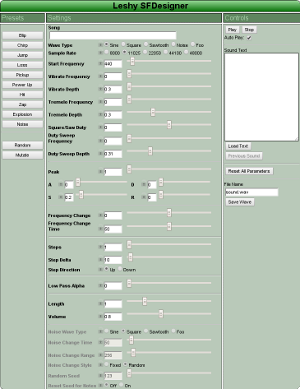
SFDesigner provides the actual interface that is used to generate
sounds. If the library is being used in an application, then
SFDesigner is not needed, since it only provides the design
interface.
SFDesigner makes use of the "range" <input> type. Browsers
such as Firefox and Internet Explorer currently lack this feature,
and so can not properly work with SFDesigner. The recommended
browser
is Google
Chrome.
To create a new sound in SFDesigner, generally the presets on the
left side are pressed repeatedly until a sound similar to what you
are looking for is created. Afterwards, the various settings can
be changed to modify the sound.
Each field has a lock icon that allows that value to be fixed so
that pressing presets further will not modify it. This is often
very helpful when attempting to find a particular sound. One usage
model involves setting known fields to reasonable values for the
desired sound, locking them, and then using the random presets to
find good settings for the other parameters.
Each of the button controls also has a shortcut key associated with
it. This can be revealed by hovering over a button, or found in
the documentation.
Detailed descriptions of each of the fields and what the values mean
are found in
the documentation.
Song Mode
One feature that sets SFMaker apart from similar programs is the
"Song" input. When this is used it is referred to as "Song Mode."
With this it is possible to play simple music or guide the pitch.
There are several examples above showing
what song mode can do. In addition to the "Song Mode" examples,
"Power Up 3" and "Pick Up 5" both use song mode to create sound
effects.
In song mode the "Length" parameter refers to the duration of each
note rather than the sound as a whole. Each note is a generated
sound of that duration made with the parameters. The "Start
Frequency" parameter is ignored, and instead for each note the
note's frequency is used as the starting point.
To specify notes, use the letters A through G. Sharps can be
specified by using lower case letters. Spaces or unknown letters or
symbols will create silence. Octaves can be specified by placing
numbers after the note, such as A3 or c6. If no octave is specified
then the deafult of 4 is used. To change the default octave the
letter 'O' may be used followed by a number. For example
"ABO5CDEFG" will play all the major notes from A to G and
"AaBO5CcDdEFfGg" will do the same with the sharps.
API
NOTE: The open source version is not yet released.
Using SFMaker as a library is simple. Web applications using the
library require WaveFile.js and sfMaker.js. SFDesigner.js is only
used for the designer GUI, and so should not be included.
<script type="text/javascript" src="WaveFile.js" \>
<script type="text/javascript" src="sfMaker.js" \>
To create an <audio> element from sound text:
var sound = sfMaker.generateAudioTag('w=Square,v=16.753,s=45');Afterwards, "sound" is an audio element, so you can sound.load() and sound.play().
Many engines need to store the sound multiple times. Generating the
audio can be CPU intensive, so instead of generating the audio
repeatedly, you can generate just the base64 data URI and then set
the source to multiple audio tags without having to regenerate the
sound for each one. For example:
var base64 = sfmaker.generateBase64('w=Square,v=16.753,s=45');
var sounds = [];
var x;

for (x = 0; x < 5; x++) {
  sounds[x] = document.createElement('audio');
  sounds[x].src = base64;
}
With any of these APIs, providing bad or out of range values could
yield unpredictable results or cause errors. It is recommended that
the values used for parameters be limited to what is allowed within
the user interface of SFDesigner.
Design Notes
When this was originally written the options for doing audio on the
web were limited. The <audio> tag was somewhat functional, but
the Web Audio API was only in its infancy. To work around these
limitations a library called WaveFile.js was created. This takes the
audio data, wraps it in a
WAVE
Header, Base64 encodes the file, and the places the results into
a data URI.
This technique works well in browsers that support the WAVE
format, but it will not work in browsers that do not. It is
still possible to use another browser to create sounds and then
export and convert them for those browsers, or even non-web-based
applications.
The SFMaker Library has 3 core parts:
WaveFile.jsA library that creates WAVE files as byte arrays and exports them
as Base64 data or <audio> tags.
SFMaker.jsThe audio generation library. This library takes "sound
text" that defines the parameters of the sound and creates
the actual sound effect waveforms from them. SFMaker.js
requires WaveFile.js.
SFDesigner.jsThe sound design utility. This provides the user interface
for designing sound effects. It does not need to be
included in games or applications that use the library.
SFDesigner.js requires SFMaker.js.
Download
A much older version of SFMaker has been released in the past under
the LGPL. The current version is planned to be released on GitHub
soon, possibly under a more permissive license. When it is
available a blog post will be made and this space will be updated.