Introducing Leshy Tuner
Posted by
Doug Haber
on 2013-05-10
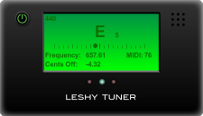
Leshy Tuner is a chromatic instrument tuner. It can be used for
tuning guitars and other instruments. It works using audio input
(such as a microphone) from your computer or other device. Leshy
Tuner makes use of functionality introduced with new web standards,
and so it works just by going to a web page with no needed
plugins.
Since this application makes use of very new web standards, it may
not work without a little effort. If you have trouble, please look
below for some notes on how to get this working.
Update: A new version of Leshy Tuner is
available with support for being used as a web widget.
See
HERE for details.
What browsers are supported?When Leshy Tuner was originally released, only Chrome Canary
supported Web Audio Input. Things have gotten better though, and
now the main releases of Chrome, Firefox, and their mobile
equivalents all work to varying degrees.
While a variety of browsers do now work, this is still a
relatively new feature, and the recommended browser is Google
Chrome. In general, it seems to perform the best and work the
most reliably. Over time support will keep improving, and this
should work better everywhere. If you are having issues, please
make sure you are using an up to date version of your web browser.
When the page loads it doesn't ask for permissionIf you are using a browser with support for web audio input then it
should prompt for asking for permission for the page to access your
microphone. If you ever clicked "deny" then this message may not
appear moving forward. In recent Chrome versions in the URL bar
you'll see a camera with a red X through it. Clicking on that will
allow you to stop denying it. In some browser versions it may be
necessary to go into your settings or preferences to undo a denial.
After granting permission the page doesn't respond to audio activityThis can be caused by a number of issues:
- Is your microphone volume high enough and not muted?
- Do you have the correct audio device selected. In Chrome, a
video camera may appear in the URL bar that will allow you to
select input devices when clicked.
- Some people reported that in certain versions of Chrome on
Windows only worked when the microphone's default sample rate
was set to certain values. Hopefully that is resolved in
newer versions of the browser.
- If you go to chrome://flags in the URL bar, look for a "Web
Audio Input" setting. If that exists, make sure it is
enabled. Any changes will require restarting the browser.
- In Linux, audio input in Chrome seems to require PulseAudio.
The detection algorithm used here isn't perfect, but generally
works well enough. The octave listed may be wrong, but that
doesn't matter much when using the application as a guitar tuner.
I've had good luck testing it with various guitars and a ukulele.
I did find that on a 12 string guitar the low E was very difficult
to get a steady reading on, but otherwise I was able to tune
everything without issue.
The microphone and its configuration makes a huge difference.
Make sure your system's microphone volume is at a good level.
Being set too high or low could make readings difficult. The
position of your instrument relative to the microphone also
matters a lot, so try out different distances and possibly angles.
Also, background noise could make it difficult to get a good
reading, so this is best used somewhere quiet, or if that is not
possible, with an instrument going through a line-input instead of
a microphone.
Once detection was working reasonably enough for tuning guitars I
stopped working on improving it. Further refinements of the
detection algorithm definitely are possible. It should also be
completely possible to fix the incorrect octave / harmonic issues
that happen. If there is enough interest I may work more on
improving this further.
Credits
Kyle Hubert contributed code that helped significantly improve the
accuracy of the detection.
Judy Shimmin Haber designed the graphics and cover art for this
application. To see more of her work go
to jhabergraphics.com.